
If you find that long prints such as at the end of the day seem to be cut short, it could be due to a setting in Control Panel. To vcheck / change this, open Devices and Printers in Control panel. A quick way to do this having closed the till software is to left click, or press and keep you finger on the Windows symbol in the bottom left of the screen as shown below. When the menu appears, select Control Panel By clicking or taping the words underlined.

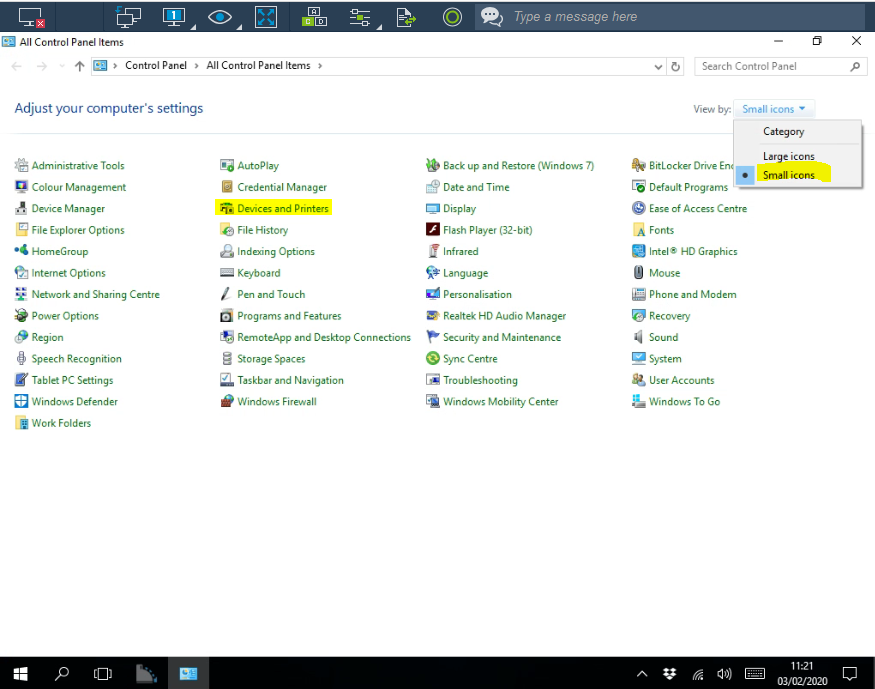
In Control Panel select Devices and Printers. If the screen does not look like the one shown below you can change the View to Small Icons using the drop down menu top right of the screen.
Find the Epson Printer, tap it to open a menu and select Printing Preferences, then Advanced

Ensure the Paper Size is set to 80 x 3276 as shown. Close the screens sequentially by pressing OK to save you changes if you have made any. When you re-open TengoPos the changes you made will automatically apply.