
If you need to move a till to another shop/site, another area within your shop/site or for any other reason there are some key things to keep in mind.
- Ensure you have closed the tengoPOS (till) software and correctly shut down the till, you can find more information about doing this here.
- If you have to unplug anything from the till i.e. label printer, receipt printer, etc. ensure you make a note of exactly where you unplugged it from.
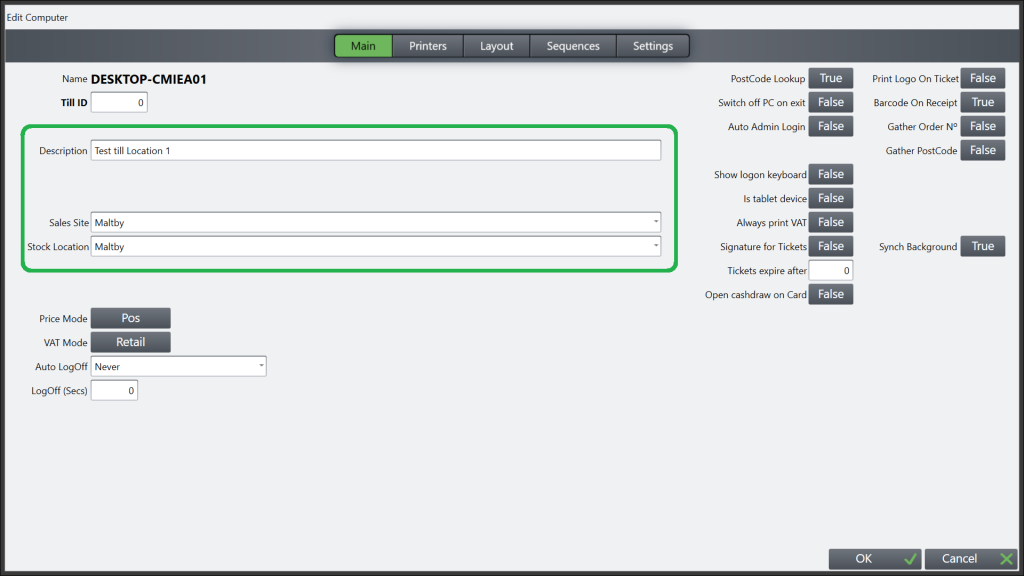
- Once you have moved the till and got everything set up open the tengoPOS software, log in, and type \\TILL on the main screen. This will then open the screen below, where you need to select the sales site and stock location for the shop/site the till is now in, failure to do this will lead to sales posting against the wrong shop/site. If you need to add or edit a sales site or stock location you can find out how to do that by clicking here. Under the Layout tab, if the site you’ve moved it to uses a different button layout, you’ll need to change the layout code also.
- You will also need to ensure you change the description of the shop/site if your organisation uses this functionality. N.B. Do not change the Till ID.
- You may need to update your receipt text to reflect the shop/site the till is now in. Click here to find out more about doing that.
If you come to use the till in its new location and have plugged any of the printers into different ports in the back of the till the printers will not work and will need setting up again. This will mean booking an install and there is no guarantee that this can be arranged at short notice and there may be a charge, which is why it is important to try to note which item came out of which port. If you do need to arrange an install please click here and select ‘I need to book an install for new equipment’.
The final thing to remember when moving a till is if it has been off for a long time there may be updates that need to be synced when the till is first back online. Therefore, in these cases please get the till switched on, get it online and open the tengoPOS software at your earliest convenience to allow the updates to be applied. Do not wait until you are about to open for the day to switch it on.
Related terms: Swap till, swapping out a till, replacing till, broken till swap, use backup till, using spare till, installing spare till, setting up spare till if main till fails or breaks