
If a printer stops working, the first thing to try as with most issues is to reboot the till, switch the printer off and on, check the cables are in correctly and the receipt roll/labels are correctly installed. You may also need to clear any failed prints from the queue. Failing this or if you have moved/swapped printers, see below.
If for some reason you need to change receipt or label printers, often the new one when plugged in will have a different name and so you need to tell tengoPOS what it is to enable printing. This can also happen if someone moves the same printer in to a different port, giving it a new name in the printers list.
To change printers, in tengoPOS type \\TILL and press enter, click on Printers and choose the correct printer name for each of the highlighted lines shown:
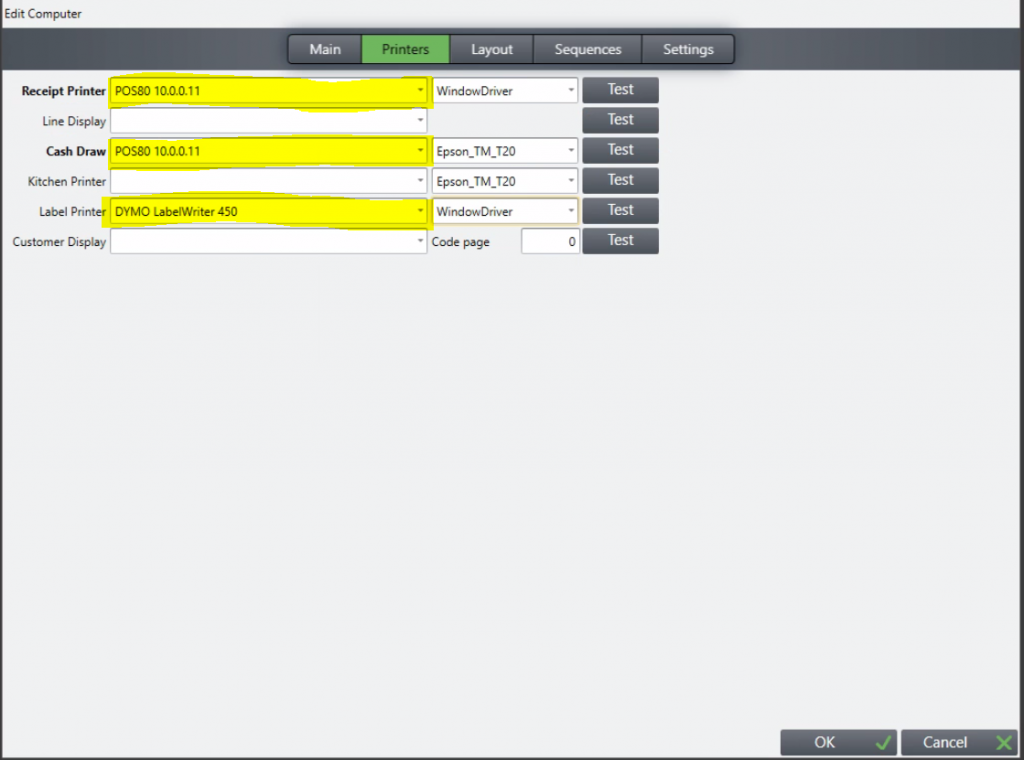
If you don’t know the name, you can try the different options and press Test and you’ll know it is right when it prints. Usually it will be similar, so if as an example you have a new Dymo Label 450, it will probably be shown as DYMO LabelWriter 450 (1).
Specifically for label printers, you may also need to change the label settings for the new printer, guide for this is here.
Related terms: Swap printer, install different printer, swapping printers, move printer, moving printers, moving ticket printer